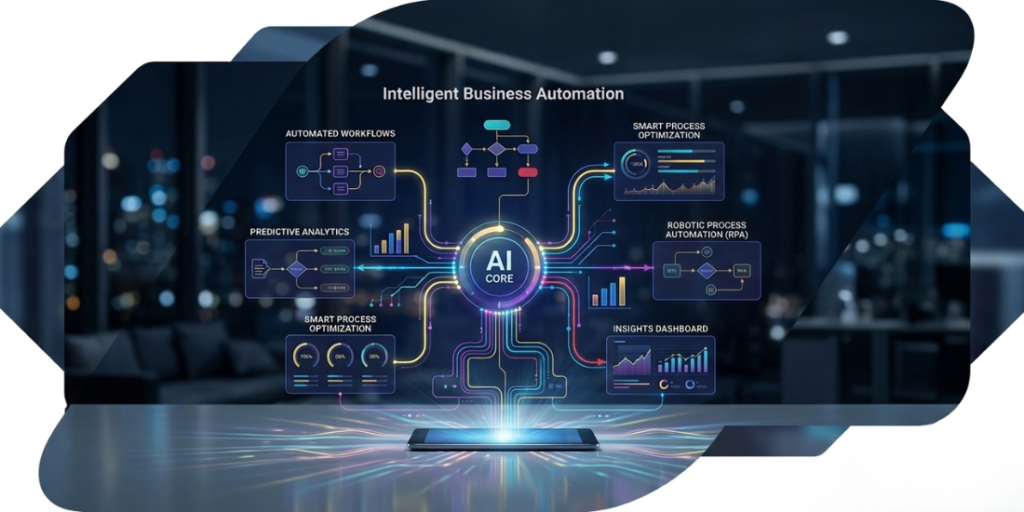
If you look at how most businesses operate today, you’ll notice something interesting: everyone is busy, but not always productive. Teams are replying to emails, updating spreadsheets, handling repetitive customer requests, moving data from one system to another, basically doing a lot of work that doesn’t really need human thinking. And that’s exactly where intelligent business automation quietly steps in. Not in a flashy “robots are taking over” way, but in a very practical sense helping businesses remove the boring, repetitive parts of work so people can actually focus on things that matter. It’s not new anymore, but the way it’s being used now is very different. It’s no longer just automation. It’s automation that can think a little, learn from data, and improve over time.
So what is it really?
Let’s not overcomplicate it.
Intelligent business automation is just a smarter version of automation. Normal automation follows instructions. Intelligent automation follows instructions, but also learns from what’s happening and adjusts itself.
For example, a basic system might send a reminder email every Monday. An intelligent system will look at customer behavior and decide who actually needs that reminder, when they’re most likely to respond, and what message might work best.
So instead of doing tasks blindly, it starts making small decisions.
That’s the main difference.
Why everyone is suddenly talking about Intelligent Business Automation
Honestly, it’s not hype. It’s just pressure.
Businesses are dealing with more customers, more data, and more tools than ever before. And humans alone can’t keep up without burning out or making mistakes.
When companies start using intelligent automation properly, a few things change very quickly. Work gets faster. Teams stop drowning in repetitive tasks. Customers get quicker responses. And suddenly, scaling doesn’t feel like chaos anymore.
That’s why even growing companies, not just big enterprises, are investing in it.
Some businesses are even working with solution providers like Hivenexis to slowly move away from manual-heavy operations and build systems that run more smoothly in the background.
The real starting point
Here’s where a lot of businesses mess up; they jump straight into tools.
But automation doesn’t start with tools. It starts with observation.
You have to actually look at your business and ask a simple question: what are we doing again and again that doesn’t really need thinking?
And when you start noticing that, the list becomes obvious pretty quickly. Things like replying to similar emails, generating reports, updating records, sending reminders, or processing invoices.
None of this needs creativity. It just needs consistency.
That’s your starting point.
Not everything needs automation at once. Pick the stuff that slows your team down the most and start there. That alone makes a big difference.
Fix the process before you automate it
This part is underrated. If your current process is messy, automation won’t fix it. It will just make the mess faster and more permanent.
So before doing anything technical, just map things out. How does a task actually move from start to finish? Who touches it? Where does it get stuck? Why does it slow down?
Most businesses realize at this stage that they don’t even need complex automation yet—they just need to simplify the process first.
And that’s actually a good thing, because clean processes are much easier to automate later.
Don’t overbuild it from day one
Another mistake people make is trying to build a “perfect system” immediately.
That rarely works.
Automation should start small. One workflow. One department. One use case. That’s it.
Once you see it working in real life, you understand what needs to improve. Then you adjust. Then you expand.
That’s how real businesses do it. Not in theory, but step by step.
What a good workflow actually looks like
A workflow is just how work moves from point A to point B in your business.
A simple example is: someone fills a form → system processes it → data is stored → email is sent → team gets notified. That’s it.
The mistake people make is trying to make workflows too complex too early. But in reality, the best workflows are usually the simplest ones that actually work without breaking.
If something is too complicated to explain, it’s usually too complicated to automate.
Where AI actually fits in
AI doesn’t replace automation. It makes it smarter.
Without AI, automation is just following instructions. With AI, it starts understanding patterns.
So instead of just reacting, it starts predicting.
It can look at customer behavior and figure out who is likely to buy. It can detect delays before they happen. It can even suggest better ways to handle tasks based on past data.
And over time, it gets better because it keeps learning.
That’s the part that actually changes how a business runs, not the automation itself, but the intelligence behind it.
Testing is where most people realize what works
No matter how good something looks on paper, real life is always different.
That’s why testing matters so much.
You try it on a small scale first. You see what breaks. You see what confuses people. You see where the system doesn’t behave the way you expected.
Then you fix it. Then you expand. It sounds simple, but skipping this step is usually where automation projects fail.
People part is just as important as tech
This is something a lot of businesses underestimate.
Even if the system is perfect, people need to actually use it.
And people don’t automatically trust new systems. Especially if they think it’s going to change their role or replace parts of their work.
So communication matters more than anything else here.
You’re not replacing their job, you’re removing the boring parts of it. That’s how it should be positioned internally.
Once people see that, resistance usually drops a lot.
When things start getting really interesting
The real power of intelligent automation shows up when AI starts making decisions, not just executing tasks.
At that point, businesses stop reacting to problems and start preventing them.
Instead of noticing a delay after it happens, the system flags it before it becomes an issue. Instead of guessing demand, it starts predicting it.
That’s when things shift from “automation” to “smart operations.”
You still need to keep an eye on it
Even though these systems are smart, they’re not magic.
You still need to check what’s happening, are things improving, are customers responding better, are errors going down, is the system still aligned with how the business is evolving?
Because businesses change, and automation needs to keep up with that.
The good news is that intelligent systems can adapt over time, but only if you’re guiding them in the right direction.
Where all of this is heading
If you zoom out a little, it’s pretty clear where things are going.
Businesses won’t manually handle most processes in the future. Systems will.
Humans will focus more on decisions, strategy, and growth, while AI handles the operational load in the background.
And the companies that start adapting now will simply move faster than the ones that wait.
Final thought
Intelligent business automation isn’t about replacing people or making things more complex. In reality, it’s quite the opposite.
It focuses on cutting out unnecessary tasks so businesses can work more smoothly and without constant pressure.
The best way to start is small. Improve your process first. Automate one task at a time, and then gradually introduce smart systems wherever they genuinely add value.
And if you’d rather avoid trial and error, working with teams like Hivenexis can save a lot of time since they already understand how to set up automation that actually works in real business settings. At the end of the day, the aim isn’t automation itself. It’s a business that runs with less friction.
What is intelligent business automation in simple words?
It’s when businesses combine AI and automation to manage repetitive tasks and support better decisions without needing constant manual input.
Is it only for big companies?
No, smaller businesses often gain even more because it reduces workload and saves time without extra hiring.
Do I need technical knowledge to use it?
Not really. Many modern tools are designed so non-technical users can also set up basic automation easily.
Will it replace employees?
No. It mainly removes repetitive work so employees can focus on more important and creative tasks.
How long does it take to implement?
It varies. Simple workflows can be set up quickly, while more complete systems take longer to properly design and deploy.
What’s the biggest advantage?
Saving time, reducing manual effort, and improving both accuracy and decision-making.